
Summary
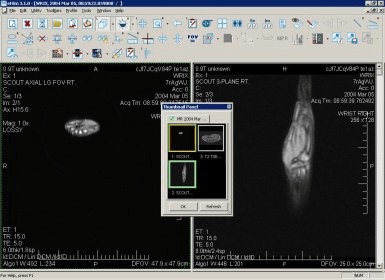
eFilm Workstation is a widely used desktop Medical imaging application developed by Merge Healthcare that enables healthcare professionals to view, manage, and analyze diagnostic medical images such as X-rays, CT scans, MRI, ultrasound, and other DICOM studies.Designed as a stand-alone workstation solution, it provides clinicians with a comprehensive platform to interpret and distribute medical imaging data in clinical environments such as hospitals, imaging centers, and diagnostic labs. Due to its intuitive graphical interface and extensive imaging tools, eFilm became one of the most downloaded and utilized software solutions for diagnostic viewing worldwide before its end of support.
Diagnostic Image Viewing and Processing
A core functionality of eFilm Workstation is its ability to display high-quality medical images with advanced tools such as pixel-for-pixel zoom, window/level adjustments, multi-planar reconstruction (MPR), and volume rendering. Users can manipulate images in multiple planes, stack studies, and view fused PET/CT datasets, facilitating detailed analysis and interpretation. These visualization tools enable radiologists and imaging specialists to thoroughly examine anatomical and pathological information, enhancing diagnostic clarity and aiding clinical decision-making.DICOM Compatibility and Integration
eFilm Workstation supports the DICOM 3.0 standard, allowing seamless communication with other imaging modalities and PACS (Picture Archiving and Communication Systems). It can receive and process digital images from a variety of sources, including CT, MRI, ultrasound units, direct digital radiography, and secondary capture devices. Clinicians can view, process, and manage these images within a unified platform, regardless of the originating device or modality, streamlining diagnostic workflows.Workflow Tools and Productivity Enhancements
The software includes features that enhance clinical efficiency, such as customizable toolbars, hanging protocols, and user profiles that save interface settings per clinician preferences. Hanging protocols help specify the default order and location of images for display, reducing setup time during routine image interpretation. Additionally, annotation, measurement, and reference line tools allow users to document findings directly on images, making the review process both robust and efficient.Media Burning and Sharing Capabilities
eFilm Workstation integrates features for creating CDs and DVDs with embedded viewers that allow referring physicians or patients to review images outside of the primary workstation. With built-in DICOMDIR support, clinicians can burn diagnostic media that includes a light version of the viewer, enabling image access on standard PCs without specialized software. This feature supports image distribution for second opinions, patient transfers, and inter-facility consultations.Advanced Imaging Features
The software offers advanced imaging capabilities such as standardized uptake value (SUV) display for PET/CT studies, true-sized printing for accurate physical templates, and gray scale presentation state (GSPS) support for key images. These features provide clinicians with additional flexibility and visualization accuracy, improving both diagnostic assessment and clinical reporting. The volume rendering and real-time reconstruction tools further enhance the ability to visualize anatomical structures in three dimensions.Clinical and Educational Applications
Clinicians, radiologists, and technologists use eFilm Workstation to support routine image review, comparative study evaluation, and educational demonstrations. Its ease of use and rich visualization suite make it suitable for both clinical diagnosis and training environments. Because it can handle multiple studies simultaneously and support synchronized image viewing, the workstation is useful in collaborative review sessions and multidisciplinary case evaluations.System Compatibility and Versions
It has traditionally been available for Windows operating systems, with support for versions such as Windows 7, 8.1, and 10. Over time, the application has seen multiple releases, including updates like version 4.2 with cloud integration features that allow routing studies directly to cloud archives and automate study distribution. However, official sales and support by the original developer ended in 2021–2022, prompting many facilities to plan transitions to alternative solutions for ongoing clinical use.Networking and Study Routing Features
Later versions of eFilm Workstation introduced auto-routing capabilities, which enabled flexible rules for sending imaging studies to PACS or other DICOM destinations without manual intervention. This capability helped integrate the workstation into broader imaging networks, improving clinical workflows and reducing administrative workload. It also provided options to compress images for bandwidth-constrained environments while ensuring data integrity across network transfers.User Interface and Navigation Ease
The software is known for its intuitive graphical interface that allows users to manage and review studies efficiently. Customizable layouts and mouse support make it easier for clinicians to navigate large datasets, switch between series, and apply image processing tools without steep learning curves. These user experience features contribute to faster interpretation times and help institutions maintain productivity in diagnostic imaging environments.End-of-Life and Transition Planning
Despite its widespread adoption, it reached the end of support on June 30, 2022, and official sales ended prior to that, according to imaging industry sources. This milestone has led many healthcare providers to seek alternative DICOM viewers or PACS solutions that can replace eFilm while maintaining familiar workflows. Organizations planning transitions must consider compatibility, data migration, and ongoing clinical needs when replacing legacy diagnostic tools.Role in Medical Imaging Strategy
As a once-leading desktop DICOM viewer, it played a significant role in enabling medical professionals to view and analyze complex imaging data efficiently at the point of care. Its combination of image viewing, manipulation, sharing, and workflow tools made it a staple in many imaging departments worldwide. While support has concluded, its legacy continues to influence how modern PACS and imaging viewers are developed and deployed in clinical settings, highlighting the importance of robust image management and diagnostic tools in healthcare delivery.Our Paid Service
If you want to Purchase Cracked Version / KeyGen Activator /License Key
Contact Us on our :
Join Us For Update :
Join Us For Update :
Crack Software Policies & Rules:
Lifetime Activation, Unlimited PCs/Users,
You Can test through AnyDesk before Buying,
And When You Are Satisfied, Then Buy it.