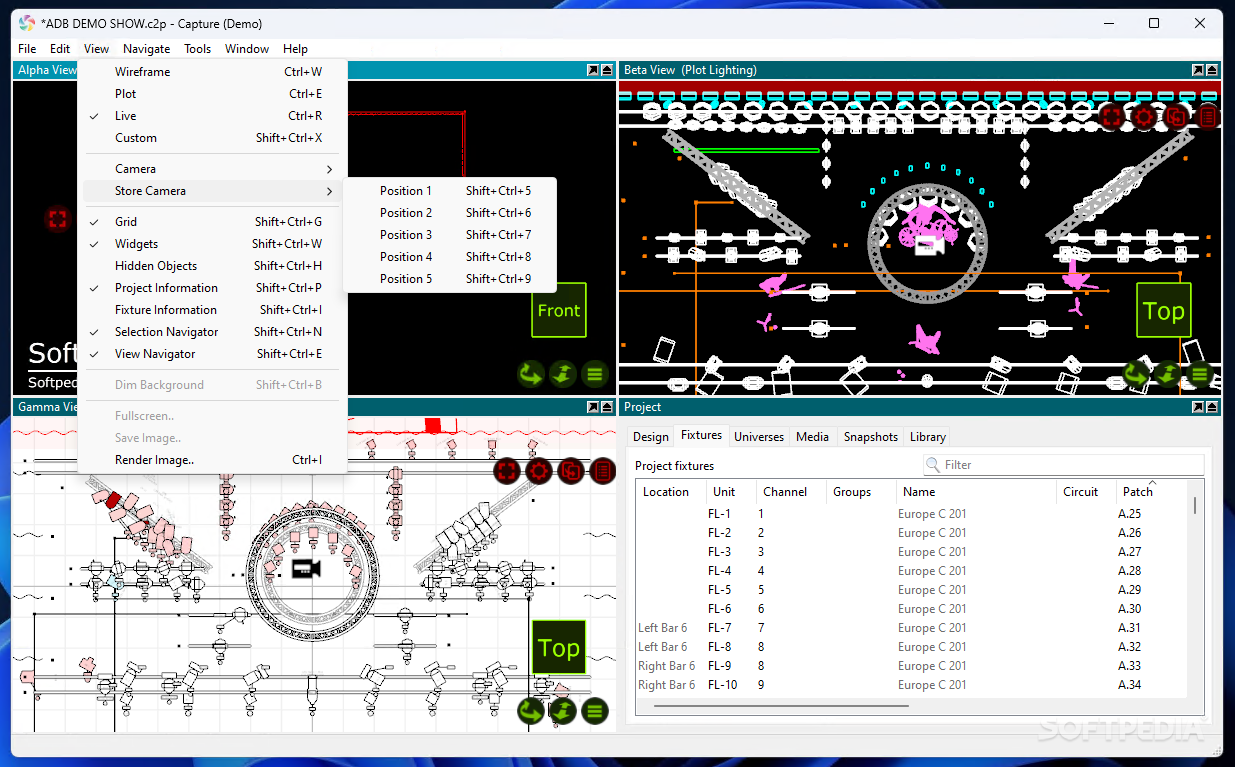
What Is Capture 2025?
It is a professional lighting design, documentation, and visualisation software that lets users create 2D and 3D lighting plots, simulate real lighting fixtures and effects, and preview lighting scenes before real-world deployment.Rather than manually testing lighting rigs in physical setups, designers can use it to:
- Build virtual stages, venues, and set layouts
- Patch lighting fixtures with real-world data
- Preview lighting in 3D with accurate photometric rendering
- Create design reports and documentation
- Plan video, laser and moving scenery integration
What’s New in the Latest Version of Capture 2025?
The latest update of it focuses on performance optimization, workflow improvements, and expanded compatibility with modern lighting equipment.Improved Rendering Engine
- Smoother real-time 3D visualisation
- Better beam clarity and shadow handling
- More accurate photometric calculations
- Improved performance with large rigs
Expanded Fixture Library
The latest version includes:- Updated fixture profiles
- Support for newly released moving heads and LED fixtures
- Improved gobo and colour wheel rendering
- More accurate manufacturer data integration
Enhanced Workflow & Stability
- Faster project loading
- Improved undo/redo system
- Better crash protection and auto-save handling
- Improved MVR import/export support
Better DMX & Protocol Support
It continues to support:- Art-Net
- sACN
- CITP
- DMX streaming
macOS & Windows Optimisation
The newest version includes performance improvements for:- Windows 10 / 11
- Latest macOS versions
- Better Metal and DirectX compatibility
What Is the Use of Capture 2025?
It serves multiple purposes in lighting and production workflows:- Design lighting for concerts, festivals, theatres and installations and see how it will look before setting up hardware.
- Automatically generate plots, paperwork and technical documentation for production teams and crews.
- Simulate DMX protocols like Art-Net, sACN and CITP along with video and laser feeds to preview show behaviour.
- Model stages, outdoor venues, clubs, houses of worship, and architectural lighting scenarios before the real build.
Who Uses Capture 2025?
It is used by many professionals in the lighting and live event industry- Professionals visualising lighting concepts and producing show designs.
- Organisations that plan large-scale corporate and live entertainment events.
- Technical directors and lighting teams for plays and performances.
- Tour lighting designers plan complex rigs in Capture before arriving on site.
- To visualise permanent lighting designs on buildings before construction.
System Specifications of Capture 2025
Because real-time rendering and 3D simulation are resource-intensive, it has specific recommended system requirements:Windows Requirements
- Windows 10 or Windows 11 (64-bit + DirectX 11.1 support)
- Dedicated GPU with good OpenGL or DirectX support
- Minimum 8 GB RAM (16 GB+ recommended)
- 500 MB+ of free storage for installation
macOS Requirements
- macOS 13.5 or newer with Metal support
- Modern GPU supported by macOS Metal
- 8 GB+ RAM recommended
How to Install Capture 2025
Follow these steps to install software on your system:1. Download the Installer
Download the installer for your operating system directly from our website:Windows: MSI installer
macOS: DMG app bundle
2. Run the Installer
- On Windows: Double-click the MSI file and follow the wizard
- On macOS: Open the DMG and drag the app into the Applications folder
3. Initial Launch
On first launch, you can choose “Demo Mode” if you don’t yet have a license. Demo mode allows you to test features but limits saving and session length.4. Close and Restart After Install
Once installed, close and restart the software to ensure all components load correctly.HomePage
Note: This price Is For Single PC License. If You Want To Buy KeyGen Then You Have To Go On Telegram ID @playoutking
Our Paid Service
If you want to Purchase Cracked Version / KeyGen Activator /License Key
Contact Us on our :
Join Us For Update :
Join Us For Update :
Crack Software Policies & Rules:
Lifetime Activation, Unlimited PCs/Users,
You Can test through AnyDesk before Buying,
And When You Are Satisfied, Then Buy it.
If you want to Purchase Cracked Version / KeyGen Activator /License Key
Contact Us on our :
Join Us For Update :
Join Us For Update :
Crack Software Policies & Rules:
Lifetime Activation, Unlimited PCs/Users,
You Can test through AnyDesk before Buying,
And When You Are Satisfied, Then Buy it.