Summary
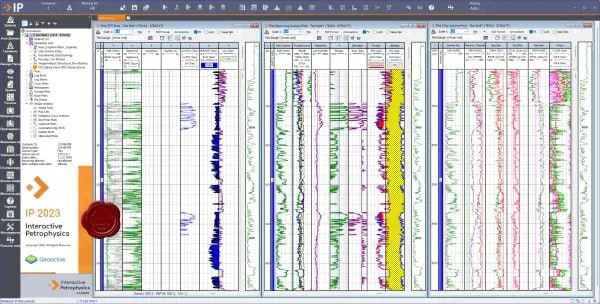
Geoactive Interactive Petrophysics (IP) 2025 v25.3.2.32201 is an advanced petrophysical analysis and well log interpretation software designed for geoscientists, reservoir engineers, and oil and gas professionals. The software provides a comprehensive petrophysical workflow for analyzing well log data, enabling precise reservoir characterization across conventional and unconventional formations. IP features a fully interactive and customizable interface, allowing users to visualize and interpret data through log plots, cross-plots, histograms, and depth-based analysis tools.Key Features
1. IP FoundationContains all tools and modules required for complete management of subsurface log data including loading, log plots, cross-plots, histograms, editing, filtering, depth shifting, and exporting. Includes Clay Volume, Porosity/Water Saturation, Cut-Off and Summations modules plus NMR Interpretation. Also includes Monte Carlo Analysis for uncertainty analysis, Chrono Log, IP Power Tools, and the ability to create custom IP applications.
2. Advanced Formation Evaluation
Carry out complex interpretations with Mineral Solver. Characterize your reservoir with Saturation Height Modeling, Hydraulic Flow Units, and Formation Testing modules.
3. Borehole Imaging
Perform enhancements and corrections to image log data. Utilize extensive display and interpretation options specifically tailored for all main image log tool types on the market.
4. Cased Hole
Assess downhole integrity of wells with casing and cement evaluation modules. Monitor reservoir fluid saturations and production performance of each well.
5. Geomechanics
Assure well stability and maximize production lifetime. Calculate pore pressures, determine wellbore stability, and calculate risk of sand production.
What’s New in Interactive Petrophysics
- Version 2025 includes enhanced machine learning capabilities for data repair and prediction of missing curves.
- Updated NMR interpretation modules with improved accuracy.
- Expanded Mineral Solver functionality for complex formations.
- Improved integration with industry-standard data formats.
- Enhanced borehole imaging display and interpretation options.
- Updated geomechanics modules for pore pressure and wellbore stability analysis.
- Performance optimizations for large multi-well projects.
- Bug fixes and stability improvements across all modules.
Installation Guide
Follow these steps to install Interactive Petrophysics 2025 v25.3.2.32201.- Download the Installer: Obtain the official Interactive Petrophysics installer from Geoactive or your authorized reseller.
- Verify System Compatibility: Ensure your system meets minimum requirements.
- Close Other Applications: Close any other engineering or analysis software.
- Run as Administrator: Right-click the installer and select “Run as Administrator.”
- Select Modules: Choose Foundation, Advanced Formation Evaluation, Borehole Imaging, Cased Hole, Geomechanics, Geophysics, or Machine Learning as needed.
- Follow the Setup Wizard: Complete license acceptance, installation directory selection, and component configuration.
- Activate License: Enter license key or contact Geoactive for licensing options.
- Launch IP: Open the software and verify installation.
How to Use Interactive Petrophysics
Step 1: Load Well Log DataImport LAS, DLIS, or other industry-standard log data formats. Load multiple wells for multi-well correlation.
Step 2: Visualize and QC Data
Create log plots, cross-plots, and histograms. Apply depth shifting, editing, and filtering as needed.
Step 3: Perform Petrophysical Analysis
Run clay volume calculations, porosity determination, and water saturation analysis. Apply cut-off and summation for reservoir intervals.
Step 4: Advanced Interpretation (Optional)
Use Mineral Solver for complex lithologies. Run Saturation Height Modeling or Hydraulic Flow Units. Perform NMR interpretation.
Step 5: Specialized Analysis (Optional)
For cased holes, assess casing and cement integrity. For geomechanics, calculate pore pressures and wellbore stability. For geophysics, create synthetic seismograms.
Step 6: Machine Learning (Optional)
Use SOM and Cluster Analysis for rock type classification. Predict missing curves or reservoir properties.
Step 7: Export Results
Generate reports and export interpreted data to industry-standard formats.
Best Use Cases
| Use Case | Module | Key Benefit |
|---|---|---|
| Conventional Reservoir Evaluation | Foundation | Clay volume, porosity, water saturation, cut-off |
| Unconventional Shale Analysis | Foundation + Advanced | Organic shale, NMR, mineralogy |
| Cased Hole Evaluation | Cased Hole | Cement integrity, fluid saturation monitoring |
| Wellbore Stability | Geomechanics | Pore pressure, sand production risk |
| Seismic Integration | Geophysics | Synthetic seismograms, fluid substitution |
| Multi-Well Studies | Foundation | Efficient correlation, consistent workflows |
Advantages and Limitations
Advantages:- IP includes powerful standard functionality that competing products charge extra for: clay volume, porosity/water saturation, cut-off and summation, pulsed neutron analysis, organic shale analysis, and NMR interpretation.
- The interactive graphical interface minimizes user errors.
- The software is stable and mathematically robust.
- The modular architecture allows users to choose a combination that meets specific needs.
- Specialized extensions include geomechanics, borehole imaging, geophysics, and machine learning.
- Industry-leading 24/7 support and world-class training are available.
- IP provides seamlessly integrated workflows across subsurface disciplines.
- The software supports efficient, auditable interpretations by tracking changes to your analysis.
- Geoactive’s team of petrophysicists, software developers, and experts has remained consistent through multiple ownership transitions.
- IP requires significant hardware resources for large multi-well projects.
- The software is specialized for petrophysical analysis, not general geology.
- Some advanced modules (Mineral Solver, Geomechanics, Machine Learning) may require additional licensing.
- The learning curve for advanced features may be steep for new users.
Frequently Asked Questions
Q1. What is Interactive Petrophysics used for?IP is used for petrophysical analysis and well log interpretation including porosity calculation, water saturation, shale volume, lithology identification, and reservoir cut-off determination.
Q2. What modules are available in IP?
IP Foundation (core petrophysics), Advanced Formation Evaluation (Mineral Solver, Saturation Height Modeling), Borehole Imaging, Cased Hole, Geomechanics, Geophysics, and Machine Learning.
Q3. What is included in IP Foundation?
All tools for log data management including loading, plotting, cross-plots, histograms, editing, depth shifting, plus Clay Volume, Porosity/Water Saturation, Cut-Off and Summations, NMR Interpretation, Monte Carlo Analysis, and IP Power Tools.
Q4. Does IP include NMR interpretation?
Yes. NMR interpretation is included in the standard IP Foundation package at no additional cost.
Q5. What machine learning capabilities are included?
Data repair, prediction of missing curves, prediction of key reservoir properties using minimal source data, and classification of reservoir rock types using Self-Organizing Maps (SOM) and Cluster Analysis.
HomePage
Note: This price Is For Single PC License. If You Want To Buy KeyGen Then You Have To Go On Telegram ID @playoutking
Our Paid Service
Looking for full-version software without limitations? You’re in the right place. Instead of wasting time on unreliable or outdated sources, unlock a powerful bundle of 10k+ premium tools covering marketing, SEO, broadcasting, automation, and business productivity — all in one place at an affordable price. This collection is specially curated for freelancers, agencies, and business owners who want fast, real results with professional tools.
Direct contact: :
Join Us For Update :
Join Us For Updated :
You Can test through AnyDesk before Buying,
And When You Are Satisfied, Then Buy It.
Unlimited PCs/Users.
Join today and upgrade your workflow with premium tools.
Looking for full-version software without limitations? You’re in the right place. Instead of wasting time on unreliable or outdated sources, unlock a powerful bundle of 10k+ premium tools covering marketing, SEO, broadcasting, automation, and business productivity — all in one place at an affordable price. This collection is specially curated for freelancers, agencies, and business owners who want fast, real results with professional tools.
Direct contact: :
Join Us For Update :
Join Us For Updated :
You Can test through AnyDesk before Buying,
And When You Are Satisfied, Then Buy It.
Unlimited PCs/Users.
Join today and upgrade your workflow with premium tools.